
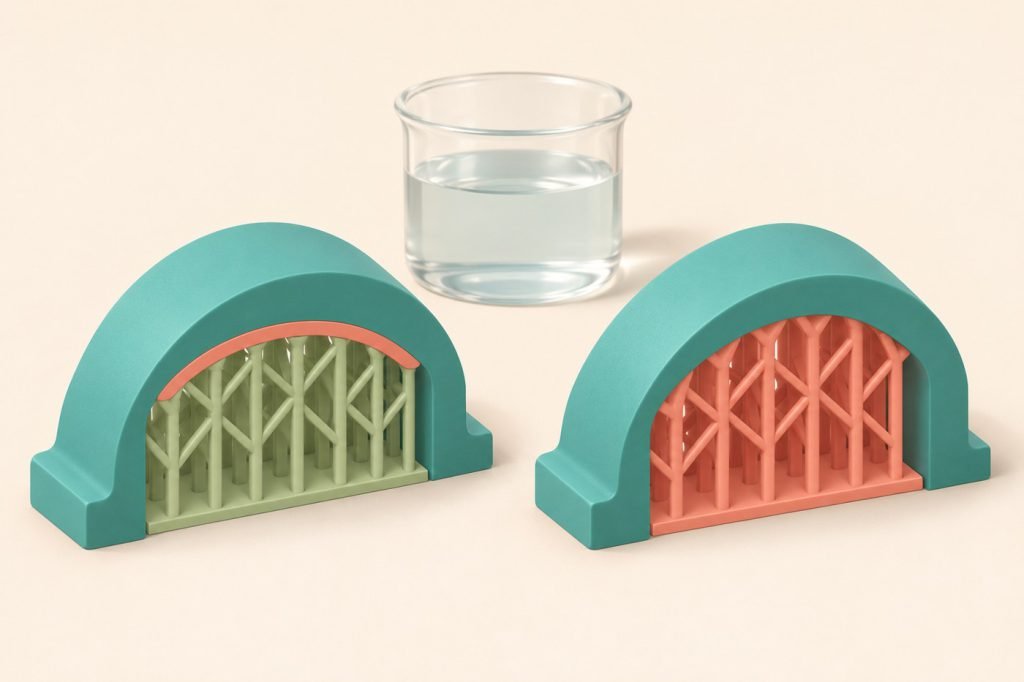
Use soluble material only at the interface when the ordinary support body can be removed afterward. Use a fully soluble support structure when the geometry makes that body difficult to extract. The choice begins with access to the support, not with the price of a spool.
Before buying PVA or BVOH, check that your printer, feed system, main material and slicer profile support the exact combination. Water-soluble does not mean universally compatible, and a model that accepts water is not automatically easy to clean internally.
Follow the support’s exit route
| Your geometry | Starting choice | Check before printing |
|---|---|---|
| Open underside | Soluble interface | Can the ordinary support body be removed once the contact layers dissolve? |
| Inner support, water access | Consider full soluble support | Can water reach the support and can dissolved material leave? |
| Closed or hard-to-reach cavity | Reconsider the design | Could splitting, reorienting or redesigning the part avoid trapped support? |
A small representative section is more informative than immediately committing to a full-size model. Include the tightest access opening and the supported surface that matters. Judge the cleaned result, not merely whether the print completed.
What “interface only” actually saves
In Prusa’s soluble-support workflow, SOLUBLE INTERFACE puts the soluble material in the dense contact layers between model and support. SOLUBLE FULL uses it throughout the support structure. The documented workflow applies to listed Prusa multi-material and multi-tool profiles; use the supported equivalent for your own machine.
The interface approach reduces the expensive material used in the support body. It does not guarantee a shorter job or a particular total saving. Inspect the sliced material totals and tool changes, including any purge structure. Our cost-per-print calculation explains why total job consumption is more useful than the model’s weight alone.
Check the assigned tool, even when the preset looks correct
Prusa documents that the slicer does not detect which slot contains the soluble filament. Verify the support and interface assignments against the actual loaded materials, then inspect the preview. A preset name cannot correct a mismatched spool assignment.
Keep the soluble material ready to feed
Prusa’s material guide identifies moisture control as essential for PVA and BVOH: wet material can lose adhesion and cause feed or clogging problems. Keep the filament dry during storage and printing, using the material maker’s documented preparation and the printer’s approved feed arrangement.
A sealed box is useful for retaining a prepared spool’s condition; it is not proof that an already damp spool has been dried. Check the exact formulation’s drying instructions and the reel’s limits before adding heat. Avoid importing a PLA drying recipe just because the model itself is PLA.
- Material pairing: verify the support formulation against the model polymer, not merely the shared nozzle diameter.
- Feed path: confirm your multi-material system accepts that formulation.
- Profile: keep the documented temperature, purge and contact settings together rather than copying one isolated value.
Plan removal before starting the print
Follow the support supplier’s removal instructions and the main material’s temperature limits. Allow room for soaking and rinsing; inspect passages and moving clearances after cleaning. Do not assume that the outside looking clean establishes that an internal cavity is clear.
For single-nozzle material changes, residual model polymer can also affect removal. Prusa notes that non-soluble carryover can prevent complete dissolution; use the documented purge guidance for that printer and material pair rather than compensating with ever-hotter water.
Pick the smallest soluble region that solves the problem
If the support body can exit, start by evaluating a soluble interface. If it cannot, evaluate a full soluble structure and its water-access route together. If neither removal route is convincing, change the geometry before buying material for a long print.
For accessible supports that only need easier separation, PLA/PETG interface pairing is a different approach worth understanding: it separates mechanically rather than dissolving.


