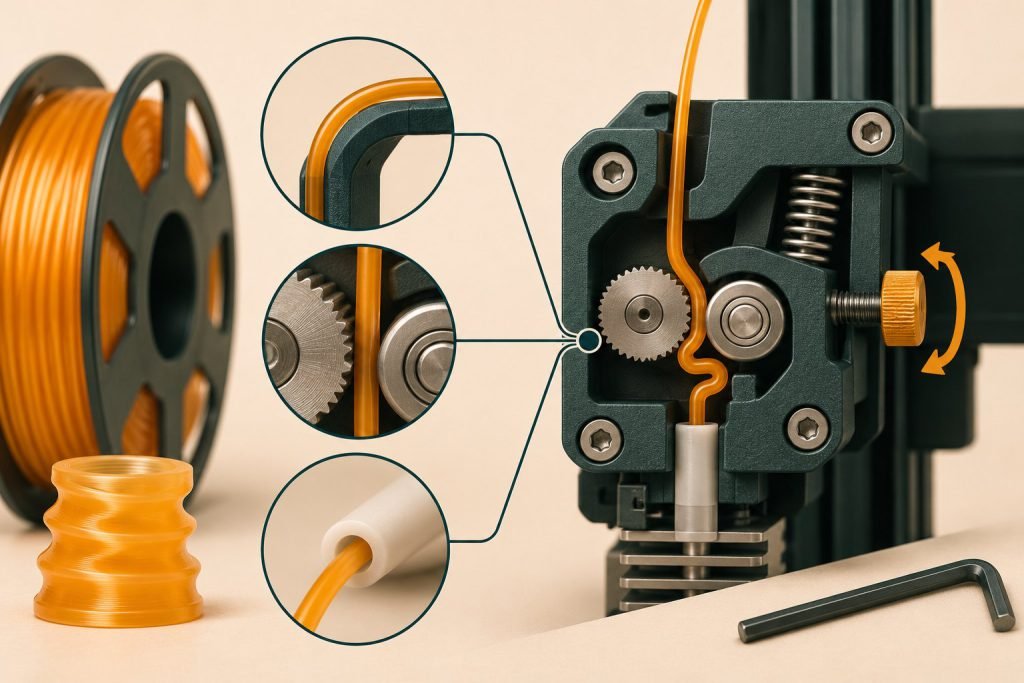
If TPU bends or wraps around the drive gears, do not assume that more clamping force will fix it. Soft filament needs a suitable feed path and a profile matched to the printer.
Three checks before another attempt
- Compatibility: confirm that the exact filament and feed system are supported. A TPU label alone is not approval for every automatic feeder.
- Profile: start with the printer maker’s supported flexible-material profile rather than a fast rigid-filament preset.
- Drive pressure: use the model’s tension instructions. Prusa warns that excessive idler pressure can make flexible filament entangle around the gears.
Prusa’s flexible-material guidance also calls for an unobstructed nozzle. Any cleaning procedure must match your hotend; this is not a universal cold-pull instruction.
Locate the unsupported section: Bowden or direct drive
Direct drive places the drive close to the hotend; Bowden feeds through a longer tube after the drive. A short path can still contain a gap where TPU folds. A longer path needs suitable tube fit and bends as well as a supported flexible-material profile.
| Installed path | Inspect with the printer’s procedure |
|---|---|
| Bowden | Tube seating, bends and the transition from the drive into the tube |
| Direct drive | The short drive-to-hotend transition and any unsupported gap |
| Either | Approved TPU grade, loading behavior and drive pressure |
Should I convert to direct drive first?
If the intended TPU is already supported, start with the documented setup and locate the actual buckling point. A conversion changes hardware and profiles; it is not a substitute for diagnosing a gap or excessive drive pressure.
Separate the symptom from the purchase decision
| Observed problem | Useful next action | What it does not prove |
|---|---|---|
| Filament folds at the drive | Check supported tension and routing | That the entire spool is defective |
| Printer rejects the feed combination | Check the exact compatibility documentation | That a different brand with the same hardness will work |
| Feeding works but strands remain between features | Treat that as a separate print-quality issue | That you should immediately tighten the drive |
Would harder TPU be easier to choose?
Check the printer’s supported grades before buying. The 90A-versus-95A guide explains the material-choice question; it does not replace model-specific feeding approval.
Should I dry it first?
Use the exact filament maker’s instructions when drying is needed. The TPU drying guide covers that process separately. Drying is not evidence that a mechanical feed problem has been corrected.
Your next step: identify the point where the filament bends, record the current profile and follow the documented adjustment for that location. If the instructions do not cover your setup, seek model-specific support before continuing.